
Manage My Booking
How to Manage YOUR Booking:
Access your booking using the portal below. You will need either your booking reference from your confirmation email, email address, or phone number attached to the order.
You can:
Resend your confirmation email or tickets.
Change your visit date up to 2 hours before your reservation time (if your ticket is eligible to be moved).
Cancel your booking if your plans change (refund eligibility depends on your ticket type, details below).
Before You CANCEL A BOOKING
While most tickets can be cancelled, your order will only be refunded if you purchased the cancellation protection add-on when you booked your experience.
How to Know if Your Ticket Can Be Cancelled for a full refund:
Open your order confirmation email.
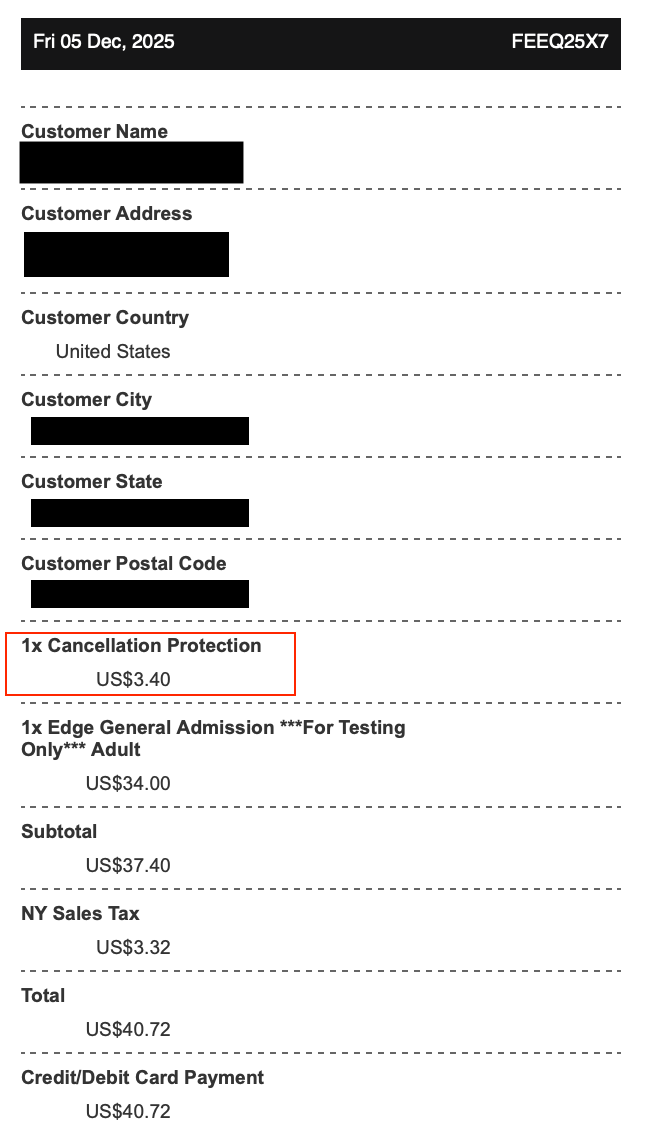
Look for the Cancellation Protection add-on. (see screenshot here for an example)
If the add-on appears on your receipt, you will have the option to cancel your reservation based on your ticket terms and receive a full refund.
Frequently Asked Questions
-
How to Know if Your Ticket Can Be Cancelled for a full refund:
Open your order confirmation email.
Look for the Cancellation Protection add-on. (see screenshot here for an example)
If the add-on appears on your receipt, you will have the option to cancel your reservation based on your ticket terms and receive a full refund.
-
The portal above is only available to people that purchased directly through us. If you purchased your ticket through a third party please reach out to the vendor you bought your tickets from for assistance.
-
If you did not receive a refund after cancelling your ticket, please ensure that your original purchase had cancellation protection included using the instructions above. You may reach out to our support team for assistance through our contact us page.
-
Cancellation Protection can only be added at the time of purchase and cannot be added to an existing booking. If you did not select this add-on during checkout, your reservation will follow the standard cancellation and refund terms for your ticket type.
-
Time changes are treated the same as date changes. If your ticket is eligible, you may select a new available time when rescheduling through Manage My Booking.
-
If you reschedule your ticket to an option that costs less than your original purchase, the price difference is not refunded. However, the remaining value will stay on your booking as a credit, which can be applied if you later change to a higher-priced time or ticket type, subject to availability.
-
Changes and cancellations apply to the entire booking and cannot be made for individual tickets within an order.
-
Your booking reference can be found in your confirmation email. If you can’t locate it, try entering the email address or phone number used at checkout in the Manage My Booking portal.
-
Eligible bookings can be changed or canceled up to 2 hours before your scheduled visit time. Changes are not available once this window has passed.